My Personal Software Factory
Let's walk through my current software development setup at home. To preface this, you might want to read my Research, Plan, Implement blog where I talk at a high level of how I approach software development with AI assistance. It gives context to why I built what I did and how I use these tools. The short summary is I take a structured approach to AI assisted software development starting with learning and understanding the problem and potential solutions, making a plan to build the solution and align with the AI, then letting AI drive towards the solution and verify with success criteria before my attention is taken again to review and ensure my intention is met both for the task and for my long term vision of the service. I did not set out on a goal to build a software factory, but rather this is the result of continuing to use new tools like language models to improve how I build software.
There are quite a few pieces of this that can be at least partially automated using a combination of agents and regular old code. Full disclosure, this will be an ongoing project as "Software Factories" always are.
What is a software factory?
First, let's define a factory. Per wikipedia factory page:
A factory, manufacturing plant or production plant is an industrial facility, often a complex consisting of several buildings filled with machinery, where workers manufacture items or operate machines which process each item into another. They are a critical part of modern economic production, with the majority of the world's goods being created or processed within factories.
So a software factory is a facility holding machinery where people create software. Next question, please!
Okay, maybe not quite that simple if the internet discourse is anything to judge by...Here are some definitions from the wikipedia software factory page:
A software factory is a structured collection of related software assets that aids in producing computer software applications or software components according to specific, externally defined end-user requirements through an assembly process. A software factory applies manufacturing techniques and principles to software development to mimic the benefits of traditional manufacturing. Software factories are generally involved with outsourced software creation.
Hmm... generally involved with outsource software creation. That does fit a world where agents are writing the code...But this term predates LLMs by a lot, it turns out. The term goes back at least 50 years. One of the most widely cited papers mentioning this is from Harvey Bratman and Terry Court, "The Software Factory" in Computer, describing the effort at System Development Corporation:
This paper describes an effort to develop an integrated set of software development tools to support a disciplined and repeatable approach to software development. This effort, which is really part of a larger program currently underway at System Development Corporation to increase software reliability and control software production costs, is intended to replace what the authors term "ad hoc conglomerations of developmental tools" with standard engineering techniques.
— Harvey Bratman & Terry Court, "The Software Factory" (1975), IEEE Computer
From all these definitions, we can see a trend line from 1975 to the present day...Paraphrasing, a software factory is a structured and integrated set of software development tools to support a disciplined and repeatable approach to software development with the goal of increasing reliability while controlling costs. Not a new concept by any means. I've tended to lump this all under the word "tooling" in the past since I look at this concept as the set of tooling that I use to produce software. The main thing that changed in recent time is that the ability and need to focus on the tooling used to produce software is now in the domain of every software developer rather than just devops, sysadmin, tech leads, and related roles supporting large teams of software engineers.
What's in a software factory?
This is going to differ by the type of software you are creating. Different kinds of software have different needs. Everything from levels of risk tolerance, compliance obligations, data protection needs, novelty, complexity, etc. There is no one-size fits all approach to this and the best factory is the one built to support the pipeline of concepts, ideas, logs, metrics, etc -> software that reliably serves the needs of it's customers in sustainable ways. Even if there is no one set of tools and technologies to build your software factory, there are some common pieces that I see in teams adopting AI-Assisted development workflows:
- Continuous Integration tooling to manage deployments and verification of other automatable checks
- Security scanners
- Code Review tooling
- Linters and formatters to enforce code style and code patterns to your standards
- Container, VM, or other sandbox layer for consistent development across teams
- Git or other version control to manage multiple changes in flight together
- A way to write code like a terminal based text editor in the most basic form or an IDE with many tools all integrated together
- Package manager for dependency management
- Compiler or interpreter for the code.
- Operating system you work within
This can go on for a while if we start describing the full stack of software that makes it possible for us to write software in time-efficient and convenient ways. You should get the basic idea from here in the full scope of the tools we have used for a long time. I am sure you have many more things to add to this list! It's not hard to see how these tools relate back to repeatable and disciplined application of software.
In addition to the above which existed prior to LLMs, we now have a lot of newer tooling that only exists because of agents which is the more interesting piece now to me:
- Harnesses like claude code or pi with the human in the loop
- Code Review agentic services like Cursor Bugbot or CodeRabbit
- MCP servers for controlled data access in agentic harnesses
- Plugins for agentic harnesses like Plannotator.ai or custom team or software specific plugins.
- IDE plugin for agents to be available inside your IDE of choice
- Skills, subagent definitions, and agent rules. These are customizations for the harness that give instruction to agents that can be either committed into your projects or distributed across projects for an organization as plugins (#4)
- Cloud runtimes for agents like Cursor Cloud
Agents in a harness like claude code now require additional tools to be grounded with your specific data. For instance, if you have design reviews of architecture in Confluence wiki, you might want to set up Atlassian's MCP server so you can easily search through and find the documents you need to reference when making changes to a service. This is a brand new consideration since prior, we had no way to automate the connection between concepts in natural language to code...but now we can...sort of, at least.
The main takeaway: Some of these tools cut across different types of software development while others are more geared towards writing specific kinds of software. Some are personal preferences while others have to be aligned on as a team for the sake of consistency and reduction of defects. It's important to think about what needs alignment with others vs your own preferences when thinking about the tools you use and how you distribute them.
What's in My software factory today?
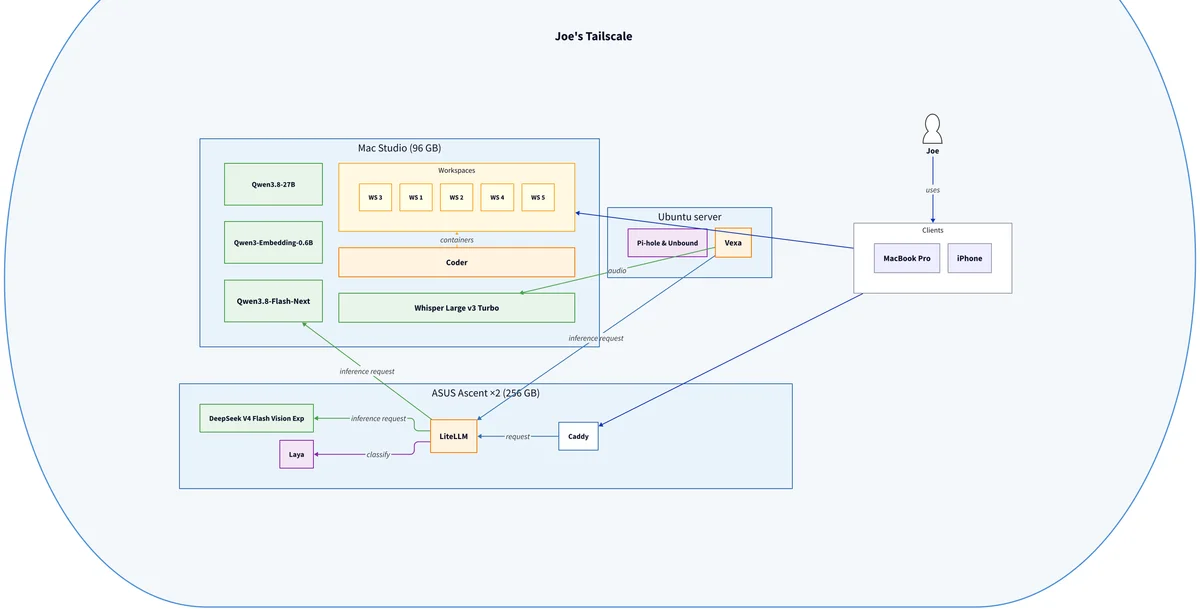
My current core software factory contains a lot more custom software and self-hosted services than ever before. Here is a high level picture.
Hardware & OS
- 2x ASUS Ascent cluster with linux (comparable to NVIDIA Spark) totalling 256GB RAM as my main inference machine.
- Macbook pro
- Mac Studio 96GB
- Ubuntu server on old gaming rig
- IPhone
Self-hosted software services
- LiteLLM - control plane and single source of models for inference
- Coder environment, backed with docker, with terraform-defined setup per project giving sandboxing and parallelized workspaces.
- Vexa - AI tool for meeting transcription management (not super into this and likely to change)
- Homelab repo containing the scripts, tools, evals, research documents, and runbooks required to run and manage these services across machines.
- Caddy for reverse proxy on some of my hosts that host multiple web apps.
- Pi-hole & Unbound - the self hosted service that started my journey into homelabbing. Local DNS resolution synced with Cloudflare's DNS on occasion with blocklist enforced for tracker domains to prevent their resolution.
AI Models
- DeepSeek V4 Flash Vision Exp (
deepseek-ai/DeepSeek-V4-Flash-Vision-Exp) on the Ascent cluster with vLLM in a multi-node setup. Daily driver and supports many parallel sessions. Custom scripts to manage it and split weights across boxes. - Qwen3.8-Flash-Next via the DwarfStar (
ds4) engine on my Mac Studio. Uses ~50GB of RAM. - Whisper Large v3 Turbo (
mlx-community/whisper-large-v3-turbo) for speech-to-text, running via mlx-whisper on the Studio - Qwen3.8-27B - dense and slow but quite capable for such a small package. Generally I prefer to use flash-next since I like the speed of mixture of experts (MOE) models.
- Qwen3-Embedding-0.6B (
Qwen/Qwen3-Embedding-0.6B) - vector embedding model. - Laya - local Jev-style "System One" classifier model. (not super into this one either and likely to change to something different)
Agentic layer & customizations
- Herdr as a multiplexer that is agent aware. This is basically my IDE now. I use it for isolating workspaces in logical ways and run it in the coder cloud environment by default which allows connecting to that instance from my macbook.
- Cursor CLI and cloud environments - depending on client work, I may use Cursor or another "off the shelf" harness usually along with some amount of my custom subagent and skill definitions since those are inter-operable for the most part. My agentic-specific stack is inspired by Cursor cloud to a large extent.
- Cursor Bugbot - automated code review tool run ad-hoc. Though, I am in transition away from this.
- Pi - simple harness with a lot of customizations
- Plannotator.ai plugin for plan mode, plan review hook, and ability to give annotations directly to a file as part of reviewing work or instructing an LLM more directly. Works great in Pi and in other harnesses like Claude Code.
- My-pi plugin. The extensions, skills, subagents, scripts, and more that I created specific for my generally applicable software development practices. Here is the full look from what I see every time I boot up pi:
[Subagents]
  audit-docs, audit-git, audit-testing, coder, doer, explorer, image-analyze, research-dns, reviewer-architecture, reviewer-correctness, reviewer-iac, reviewer-legal, reviewer-security, reviewer-ste, reviewer-typescript, scout, verifier

[Context]
  AGENTS.md

[Skills]
  cleanup-plans, code-review, coder-workspace, durable, github-ci-remediation, orchestrate, parking-lot, plannotator, plannotator-annotate, plannotator-inbox, plannotator-last, plannotator-review, playwright-cli, pr-triage, repo-audit, report-harness-issue, ste-review, system-one-probe

[Extensions]
  @plannotator/pi-extension:, banned-commands.ts, durable.ts, git-state.ts, herdr-agent-state.ts, homelab-laya.ts, homelab-litellm.ts, image-budget.ts, plan-approval-hook.ts, pr-status-footer.ts, skill-toggle.ts, startup-agents.ts, ste-tools.ts, subagent, voice-dictation.ts
A future article will go more in depth on the harness layer and the purpose of each of these pieces, (if you are interested, let me know, please!). Notably, most skills are ad-hoc and not agent-invocable. Additionally, some projects have project specific harness customizations: I have a custom extension that changes the TUI and an MCP to access Scryfall defined in a .pi directory inside my Magic: The Gathering deck brainstorming repo as one example. Pi's flexibility and minimalism allows me to customize it deeply to any project while my plugin manages the cross-cutting tooling I use frequently. And the environment it runs within holds the tooling needed
Basics
- git for version control
- VSCode for reading MD documents, mostly. XCode only when I absolutely must use it to build.
- AWS CDK, SST, Wrangler, Terraform, etc. Depending on project I always have some infra as code to back it up. Terraform is used to manage my coder envs.
- GitHub for Code Review, git hosting, and CI actions that enforce tests and other guard rails are passing. Also a central place to document decisions, align with other people, run static analysis checks and agentic loops for code review. I rely on this probably more than I should and is notably a core piece of my software factory that I am NOT in full control of. Open to recommendations on CI and code review tooling that I can fully own end to end! 👀
- Tailscale - Really awesome service with a generous free tier to create a virtual private network accessed via tailscale network on devices where my user pool log in. Allows me to access my services anywhere over https.
- Oxlint, eslint, pnpm, vitest, and lefthook to enforce my typescript apps build, lint, typecheck, and pass unit tests before a commit can successfully complete. Lefthook makes it so the agent loop knows the mistakes it made and can fix them before I look. In other languages, I will always use some kind of equivalent tooling.
- Other cloud based tooling as applicable. For building, I tend towards AWS and/or Cloudflare for infrastructure/hosting.
- Markdown as a document format with frontmatter (sometimes custom definitions to enforce things). I tend to keep a backlog of ideas in md in lieu of project management software, but you should probably not live as chaotically as I do on this point...
- vim for terminal-native light editing
- Various unix commands to do stuff, sometimes with my own scripts. Pi allows
!<command>which let's you work inside the pi TUI alongside your agent (pair programming). - Firefox as my regular browser with Chrome as a secondary one. Playwright CLI drives chrome, usually for end to end testing the agent can drive.
Notably missing
- Project management software. I do like Linear.app but it has not become a habit for personal use...but it's my intention to do so in the future which likely will involve using their MCP as a core part of my pi setup. I will use Jira, Linear, or whatever else clients I work with use for managing backlog and issues, it just has not become a habit for my own projects. Project management software is pretty vital for a team and solves the issue of having a place for semi-ephemeral artifacts needed for context carryover across agent sessions and alignment with people. I currently solve this by committing and eventually deleting important research, in progress plans, and other various md files to track the state of and context for ongoing work.
- Secret management infrastructure. It's on my backlog to use (maybe self-host) Infisical and integrate this with my coder and other ways of management of credentials. Right now there is too much manual process.
- Probably other stuff I did not list out that I use daily. Let me know if there is another tool you find vital for your day to day development!
I tried many other tools and software including other AI harnesses and local model runners. Odysseus, Hermes, Opencode, etc. None really stuck for me or were bloated in ways I did not like. While, it has been a lot of work to create and maintain my-pi customizations, it also has left me with a very token-efficient and understandable harness. I know how it manages the context, deeply and I have direct ability to influence that.
Why did I do all of this?
The short answer is two-fold:
- to own the means of production for my business
- to learn by doing.
My business, Joemocode Solutions LLC, is a bespoke software development service business. I work with small to medium size businesses, helping them to quickly build and launch enterprise-grade products and/or provide coaching and consultation around agentic software development.
I became increasingly concerned with the move towards closed-source harnesses from the major AI labs given the level of power they have in very privileged settings (eg, my laptop with all the various tools and access I personally have). Not only from security, privacy, and business confidentiality standpoint, but also from a technical standpoint...Context management is the most important piece of agentic engineering and you have no ability to see exactly how context gets managed in a closed source harness with a hosted model that encrypts the reasoning trace. You must instead rely on documentation that is frequently out of date and changes as the harness itself changes and be okay with not having full transparency. Each of these sometimes big changes to a harness is not always treated appropriately by the companies that make them and might necessitate changing your customizations or ways of working, so it is a different kind of maintenance burden.
On the model side, I have been a big believer in local models being the future of most AI use as I wrote about here. 2026 has been quite a year for open weight model releases and I frankly did not expect to be capable of doing that literally this year in large thanks to the labs which open their weights. Originally, I was trying to mainly learn more deeply about hosting models and the plethora of decisions and tradeoffs that comes with it. I was planning to keep an AI subscription for myself while off-loading some small tasks to local models, but my goalposts moved from the level of usefulness I got from deepseek-v4-flash in particular. Since I had to manage the deployment and maintenance of the models and surrounding infrastructure, it made sense to keep going down this path. It became clearer to me on the benefits every time a cloud provider has a service outage or there is a bug shipped to a harness. At least my harness bugs are directly caused by me.
Should you do this?
If you are asking me this question, I will probably tell you "no". The longer answer:
Harness: I have been working with agentic-style harnesses for software development for more than one year now. I have deeply used Cursor (all forms), Claude Code CLI, and now Pi, driving likely over a billion tokens through each which gave me the opportunity to learn what I liked and did not like in a harness. You should start with one of the more developed off the shelf harnesses and learn it deeply. Customize it with plugins, skills, custom rules. Try different ways of working with the harness with you in the loop while looking for opportunities to leave the loop and improve your workflows. This is what gives you the knowledge basis to learn the tooling that best helps you and how you (and your team) work. These off the shelf harnesses are quite good despite my claims of bloat and their constant change. One person's bloat is another person's features. The only way to really know what you want and find useful is to try new things. If you know what you want in a harness and are aligned with the people you work with, Pi, then, is a great choice. And of course, you can use different tools on different projects. All harnesses can and should be catered to how you build software, but instead of starting from scratch with pi, you should likely use the off the shelf tooling and learn to cater it to your ways of working.
Self-hosted services: the answer here is the same as with any homelabbing; you are trading time, resiliency, and up front capital investment to remove the need for subscriptions (aka, reliance on other providers which may change their terms of use at any time). This is especially an issue with self-hosted LLMs. The hardware I listed above is expensive and sadly has only gotten more expensive since I bought it. Also notably my self-hosted LLMs are much slower than even a large frontier model, so they need even more different ways of working to really maximize the value especially with regard to breaking down problems well. And I will not claim they are better for the average person than Opus 5.5 or GPT 6.1 Sol even if they are better for me. Things like session context limit and KV cache size directly relate to how much RAM you have and have an enormous impact on the possible usefulness of a model. And we're having a bit of a bottleneck right now on RAM. So the costs are likely not going to be worth it to you from a financial perspective and the tradeoffs can hurt if you are not 100% invested to tweaking your agentic engineering pipeline, constantly. When I started down this path, 2/3rds of my commits were in my homelab or pi customizations. That's inverting now, but the point is it's a lot of work and debugging becomes harder because your scope of work/ownership is larger.
But, I want to
Great, join me! If you are happy to trade some money, time, attention, resilience and are willing to support live services and learn a lot, you too can realize the benefits of local LLMs and build your own self-hosted software factory. Privacy, confidentiality, and true ownership over the means of your work is extremely important to me and the major reason why I would recommend you go down the path of local models and open source harnesses. You have full freedom to use your setup forever no matter how the terms of use or costs of providers change which they must if the companies in US are to survive. I'd love to learn what you do and the types of services and techniques you find helpful. I guarantee you will learn a massive amount both in how LLMs work, but also about LLM operations which is really slept on right now as a field in software engineering. There is a lot to learn that I had no awareness of before diving in and I believe will be an important role in the future for many medium to large companies, especially. There are more exciting things released each month in this space.
Getting started
You do not need to invest 10k to get started with local LLMs. I'd suggest to find a model that can run on hardware you have already and hook it up to pi, opencode, or LM Studio for a GUI chat interface. Temper your expectations, of course, especially if you do not have 100s of GB integrated RAM. No matter how old and crappy that model is, you will learn a lot in doing so. Find someone online who has written about the specific hardware and model. There are models for all kinds of purposes, and all LLMs have their own flavors and things they are good at, so not all are equal especially on the small side for agentic purposes. Older Qwen MOE models (I used qwen-coder-30B-A3B for a while) worked pretty well for me on an integrated memory system (Macbook with most RAM dedicated to this) to get started before I had AI-specific hardware running them. And soon qwen4 is coming out and might have a suitable, capable, small model...
On the side of other tooling, even if you stick with the frontier, I encourage you to try new things. Make a skill that is committed to a repo where it can help with some chore you do often, or try new harnesses that are allowed by your CISO. Use a cloud environment and do the work needed to make it useful for something you work on. There are so many things to try and I hope the list of tools and services above gives you some more ideas of primitives you can use.
Conclusion
So there ya have it, folks! That's a bit of history to the concept of the software factory as I see it, and a high level view of my personal software factory as it stands today, ranging from the hardware to the harness layer and all the services in between. Appreciate you reading and please, let me know if this inspires you to dive deeper into agentic engineering, homelabbing, or got you thinking in new ways!